Image Tagging Software: 8 Tools Compared by Where the Tags Live and Who Does the Tagging
Image tagging software splits into two families that people keep confusing. The first writes keywords into the files themselves (Adobe Bridge, Lightroom Classic, digiKam, XnView MP) so the tags travel with the photos to any other app. The second keeps tags in its own library and, increasingly, adds them for you with a model that runs on your machine (Refchi, Excire Foto, digiKam's auto-tag engine, self-hosted Immich or PhotoPrism). Photographers who deliver files usually need the first. Designers with thousands of references and screenshots usually need the second, because they will never tag by hand. Prices and the catches are below.
Tags are the organizing method everybody recommends and almost nobody sustains. I have watched designers set up a beautiful keyword vocabulary, tag the first 200 images, and then never tag another one. By the time the library reaches 4,000 files, 5% of it is tagged, and a search for "hero" returns a confident, useless handful. I went into why in how to organize design references.
So the question behind "which image tagging software" is really two questions: where should the tags live, and who is going to apply them. Answer those and the tool picks itself. Two disclosures first: I make Refchi, one of the tools below, and this list is written for Windows, since that is where I can test.
Question one: where do the tags live?
- Inside the file (IPTC and XMP metadata). Bridge, Lightroom Classic, digiKam, and XnView MP can write keywords into the JPEG or TIFF, or into a sidecar file next to a raw. Any other program that reads XMP sees them. This is the professional standard for photographs, and it is useless for screenshots, SVGs, fonts, and PDFs, which either cannot hold the metadata or nobody reads it from.
- In the app's own database. Eagle, Refchi, Excire, and most tools sold as asset managers keep tags in their library. Faster, works for any file type, and the tags stay behind if you leave the tool, though most can export them.
- In the filename or a sidecar. TagSpaces renames img-9832.jpg to img-9832 [sunset bahamas].jpg, or writes a small sidecar file next to it. Portable, plain, and slightly odd to look at.
Question two: who applies the tags?
Manual tagging works when someone is paid to do it, or when the vocabulary is tiny. Automatic tagging works when you accept that the tags will be generic ("building", "person", "text", "food") but present on every file. The useful change in 2026 is that automatic tagging no longer needs the cloud. Small vision models run on an ordinary laptop: digiKam ships YOLO and EfficientNet models for its auto-tag engine, Refchi runs a CLIP model plus OCR, Excire Foto does its keywording locally, and Immich and PhotoPrism run their models on your own server. None of the tools in this article send your images anywhere unless you choose a cloud option yourself.
Eight image tagging tools at a glance
| Tool | Price | Tags stored | Automatic tagging | Reads text in images | File types |
|---|---|---|---|---|---|
| Refchi | Free | App library | Yes, on-device content tags and categories | Yes, on-device OCR | Images, screenshots, video, PDF, fonts, 3D, bookmarks |
| Eagle | $29.95 once | App library | No | No | Very broad |
| Adobe Bridge | Free with an Adobe account | In the file (XMP/IPTC) | No | No | Images, video, design files |
| Lightroom Classic | From $9.99 per month | Catalog, optionally written to XMP | No (cloud Lightroom has Sensei search) | No | Photos, raw |
| digiKam | Free, open source | Database, optionally in the file | Yes, on-device (YOLOv11, EfficientNet), plus faces | No | Photos, raw, video |
| XnView MP | Free for personal use | Categories in database, IPTC/XMP in file | No | No | Almost every image format |
| TagSpaces | Lite free; Pro about €39 per year | Filename or sidecar | No | No | Any file |
| Excire Foto 2027 | One-time purchase | App database, keywords exportable | Yes, on-device keywords, faces, aesthetics | Yes, on-device text search | Photos |
If the tags must travel with the files: Bridge, Lightroom Classic, digiKam, XnView MP
Adobe Bridge is free with an Adobe account and remains the plainest way to write IPTC keywords into a photo: a keyword panel, hierarchical keyword sets, batch apply, metadata templates. Nothing is automatic; the keyword you did not type is not there. It is a browser, not a library, so it only knows about the folder you point it at. For designers it fits worst, which is why I wrote a whole piece on Bridge alternatives.
Lightroom Classic (from $9.99 a month in the Photography plan) has the most mature keywording of any photo tool: keyword hierarchies, synonyms, the painter tool, keyword sets, and optional write-back to XMP. Automatic tagging is not in Classic; the cloud version of Lightroom uses Adobe Sensei for search, and that is a different product with a different storage model. If you are a working photographer you are probably already here.
digiKam is the free, open-source photo manager that quietly became the best tagging tool in this category. Tags are hierarchical and can be written into the files, and since version 8.3 digiKam tags photos automatically with a deep-learning engine that runs on your machine; the engine was rewritten in 8.6 around YOLOv11 and EfficientNet models with an adjustable confidence threshold. It also does face recognition and geotagging. The interface is dense and the first setup takes an evening. It is aimed at photographers, so a folder of UI screenshots and SVGs will feel out of place.
XnView MP is the fast, no-frills viewer that also does categories and IPTC/XMP keywords, with batch operations that beat most paid tools. Free for personal use, licensed for commercial use. No automation and no OCR. A very good tagging front end for people who will actually type the tags.
If the software should tag for you: Refchi, Excire Foto, Immich, PhotoPrism
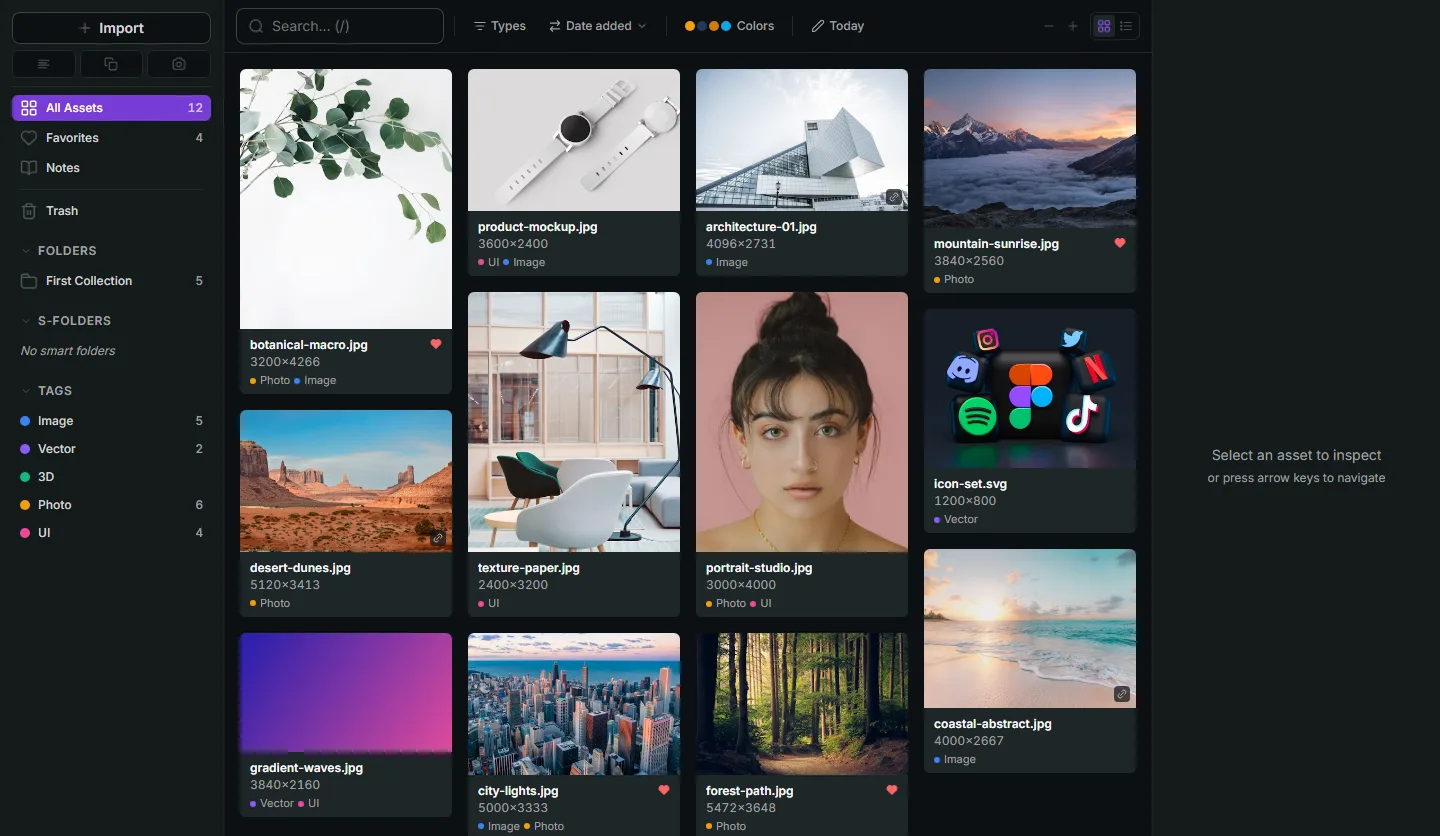
Refchi is a free local library for Windows that treats tagging as something software does. After import, models run on your own machine: a vision model adds content tags ("person", "building", "landscape"), a classifier adds a category (photo, screenshot, icon, illustration), OCR extracts any text, and colors are pulled into a palette. On top of that a sentence-embedding model lets you search by meaning, so the generic tags matter less than they would elsewhere: "moody kitchen with warm light" works as a search whether or not anything was ever tagged "kitchen". Your own tags exist too, colored, with smart collections built on them, and the library handles screenshots, PDFs, fonts, video, and 3D alongside photos. What it is not: a photo editor, a raw developer, or a Mac app yet. Tags live in the library, not in the files. Download and full feature list.
Excire Foto is the photographer's version of the same idea: a standalone, one-time-purchase app for Windows and Mac that keywords every photo automatically, finds faces and people, rates aesthetics, detects duplicates, and, in the 2027 release, searches for visible text in photos, all on-device. The previous version listed at $189; check excire.com for the current price. It is aimed squarely at large photo collections and does that job better than any free tool. For mixed design libraries it is the wrong shape.
If you already run a home server, Immich and PhotoPrism are free, open-source photo libraries that tag with machine learning on your hardware: object labels, faces, and, in Immich, natural-language search over a CLIP model. They are phone-backup and family-photo tools first, with web interfaces and mobile apps, and they need a server, Docker, and patience. For the self-hosting crowd they are excellent. For everyone else they are a weekend project.
If you tag more than photos: TagSpaces, Eagle, Refchi
TagSpaces tags anything, because its tags live in the filename or a sidecar file: documents, images, code, whole folders. The free Lite edition covers tagging and search inside a folder; Pro (about €39 per year) adds tag-based search across locations, geo tags, and more. No automation at all. It suits people who want a plain-files, no-database life and are willing to type.
Eagle ($29.95 once) has the broadest format support of any design library, a good manual tag system with smart folders, duplicate detection, and color search. It does not tag automatically or read text, so it depends on you. In practice Eagle users lean on folders and the browser extension's saved source URL more than on tags. I compared it with the free options in Eagle alternatives.
How to choose image tagging software
- Deliver photos to clients or agencies and need keywords in the files: Lightroom Classic if you already pay Adobe, digiKam if you do not, XnView MP for fast manual keywording.
- Large personal photo archive, want it tagged for you without a subscription: digiKam (free) or Excire Foto (paid, more polished).
- Design references, screenshots, and mixed files, want tags and text search without doing the work: Refchi (free, Windows).
- Design library with the widest format support and manual tags, any OS: Eagle.
- Everything as plain files with tags in the name: TagSpaces.
- Already running a server: Immich or PhotoPrism.
One last thing. Whichever you choose, keep your manual vocabulary under fifteen tags and let the automatic ones be as generic as they are. A tag applied to every file beats a precise tag applied to 5% of them.
Frequently asked questions
- What is the best free image tagging software?
- digiKam for photographers: hierarchical tags, keywords written into files, and on-device automatic tagging with face recognition. Refchi for designers on Windows: automatic content tags, OCR, and semantic search across images, screenshots, PDFs, and fonts, all local and free.
- Can software tag my images automatically without the cloud?
- Yes. digiKam (YOLO and EfficientNet models), Refchi (a CLIP vision model plus OCR), Excire Foto, Immich, and PhotoPrism all run their tagging models on your own hardware. Nothing is uploaded.
- Should tags be stored in the image file or in the app?
- In the file (IPTC/XMP) if other people or other programs need to read them, which is the case for delivered photos. In the app if you need speed, mixed file types, or automation. Several tools do both: digiKam and Lightroom Classic keep a database and can write back to the files.
- Does Adobe Bridge tag images automatically?
- As of September 2026, no. Bridge lets you apply and batch-apply keywords by hand and writes them into the file's metadata. Automatic tagging based on image content is a feature of the cloud version of Lightroom, not of Bridge.
- Can image tagging software read the text inside screenshots?
- Only tools with OCR. Refchi runs OCR on every image on-device and makes the text searchable. Excire Foto 2027 added visible-text search for photos. Eagle, Bridge, Lightroom Classic, digiKam, XnView MP, and TagSpaces do not read text inside images.
Keep reading
- How to Organize Design References: A System That Still Works at 10,000 FilesFolders fail around file 2,000. Tags fail when you stop tagging. Here is a system for design references built on capture habits, a small set of rules, and search that does the remembering for you.
- Adobe Bridge Alternatives: What to Use Instead, Sorted by Workflow (2026)Bridge is free but slow, needs an Adobe ID, and is really a photo tool. The right replacement depends on whether you cull photos, browse design assets, or tag everything.
- Screenshot Organizer for Windows: 7 Tools Compared, Plus the Habit That Makes Any of Them WorkYour Screenshots folder has 3,000 files named by date and no way to search what is in them. Seven Windows screenshot organizers compared, from Snipping Tool to full libraries.