Adobe Bridge Alternatives: What to Use Instead, Sorted by Workflow (2026)
Adobe Bridge is still free in 2026, but it requires a free Adobe ID to activate, it is slow to open on big folders, and it was designed around photographers, not designers. The best alternative depends on your job. For culling and rating photos, digiKam (free, open source) or XnView MP (free for personal use). For a designer's asset library with tags, color search, and screenshots, Refchi (free, Windows) or Eagle ($29.95 one time). For pure tag-based organization across every file type, TagStudio (free, open source). Each is covered below with what it does badly, not just what it does well.
Bridge is one of those tools people use for a decade without ever choosing it. It came with Photoshop, it was there, so it became the folder browser. Then something changes: it takes 40 seconds to build thumbnails for a folder, or you cancel your Creative Cloud plan and find out Bridge still wants an Adobe login, or you realize you are using a photo-culling tool to manage icons, screenshots, and brand assets. That is usually when the search for a replacement starts.
A quick note on where I am coming from: I build Refchi, which appears below. I have tried to keep that entry as skeptical as the others.
What Bridge actually is, and why that matters
Bridge is a folder browser with metadata tools. It does not import anything; it reads whatever folder you point it at, shows thumbnails, and lets you rate, label, keyword, and batch-rename. Its strengths are real: raw file support, Camera Raw integration, batch operations, and it is free to download without a paid subscription. The catch since around 2019 is that a free Adobe ID and an internet connection are required to activate it.
Its weaknesses are also real. It is slow on large folders because it generates thumbnails on the fly. It has no idea what is in an image; search is filename and metadata only. And the interface is a 2008 photo-studio interface, which is fine if you are a photographer and tiring if you are not.
So the first question is not "what replaces Bridge" but "what was I using Bridge for." There are three common answers, and they lead to different tools.
Alternatives at a glance
| Tool | Built for | Runs | Price | Reads folders in place? |
|---|---|---|---|---|
| digiKam | Photo management, raw, faces, geotags | Windows, Mac, Linux | Free, open source | Yes |
| XnView MP | Fast browsing and batch conversion | Windows, Mac, Linux | Free for personal use | Yes |
| Refchi | Designer's asset library with on-device AI search | Windows | Free | Yes (link mode) or copy |
| Eagle | Designer's asset library, very mature | Windows, Mac | $29.95 one time | Copies into its library |
| TagStudio | Tag-first organization of any file type | Windows, Mac, Linux | Free, open source | Yes |
| Windows Explorer / Finder | The default | Built in | Free | It is the folder |
If you used Bridge to cull and rate photos
digiKam
digiKam is the serious free option for photographers. It is open source, it handles raw files, it does face detection and geotagging, it has star ratings and color labels like Bridge, and it stores its data in a real database rather than sidecar files, which is why it stays fast at tens of thousands of photos. It runs on Windows, macOS, and Linux.
The cost is complexity. digiKam has hundreds of settings and a first-run setup that asks questions most people cannot answer. Give it an afternoon. If you shoot raw and manage a large photo archive, it is worth the afternoon. If you have 300 product shots and some logos, it is the wrong size of tool.
XnView MP
XnView MP is the fast, no-nonsense browser. It opens instantly, reads basically every image format ever invented, batch-converts and renames well, and does ratings and categories. It is free for personal use (a license is required for commercial use). The interface will not win awards, but nobody using XnView cares about that; they care that a folder of 5,000 images opens in a second.
If you used Bridge as a design asset browser
This is where most designers land, and where Bridge fits worst. Screenshots, icons, brand assets, client references, fonts, the occasional video: Bridge can browse these, but it cannot search inside them, tag them quickly, or show you a font sample. Two tools were built specifically for this job.
Refchi
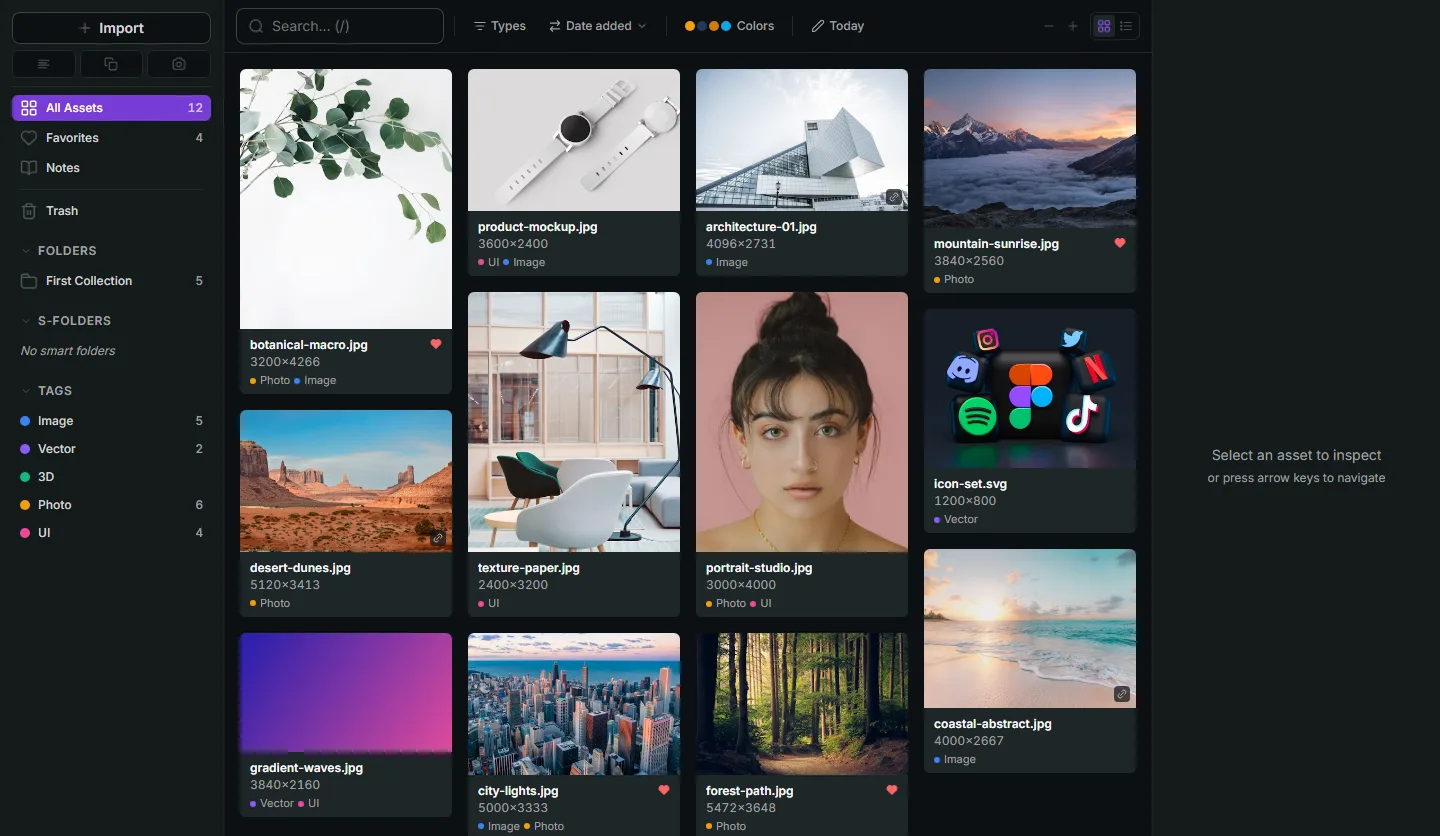
Refchi is a free library app for Windows. Import a folder in link mode and it indexes the files where they are, like Bridge, or copy mode and it takes its own copies. You get a thumbnail grid with adjustable density, folders, tags, smart collections built from rules, and full-screen previews for images, video, audio, PDFs, fonts (with a glyph sample), Lottie files, and 3D models.
The part Bridge cannot do at all: search by meaning. Refchi runs a small embedding model on your own machine, so "blue product shot on white" finds the blue product shots on white, regardless of filename. It also pulls text out of screenshots with on-device OCR, so the error message you screenshotted in March is findable by typing part of the error. And it extracts color palettes so you can filter a library by hue. None of this touches the internet; there is no account and no upload.
The gaps: Windows only for now (macOS is in development), no raw processing or Camera Raw integration, and it is a beta that updates often. If your work is photography, use digiKam. If your work is design, this is the tool I wish had existed when I was living in Bridge. Details and download.
Eagle
Eagle is the established paid option in this category: $29.95 one time for two devices, Windows and Mac, with a 30-day trial. It has a browser extension for clipping from the web, color search, smart folders, and a long list of supported formats. Its main difference from Bridge is philosophical: Eagle copies files into its own library folder rather than browsing yours in place. Some people find that reassuring. Others hate having two copies of everything. Know which one you are before you commit.
If you want to tag every kind of file, not just images
TagStudio
TagStudio is an open-source project that treats tags as the primary way to organize files of any type, with the interesting idea of tag inheritance (a "golden retriever" tag can inherit "dog" and "animal" automatically). It reads a folder in place, so nothing moves. It runs on Windows, macOS, and Linux.
Two things to know. It is still early software with visible rough edges, and support for multiple library roots was on the roadmap but had not shipped as of this writing, so it wants everything under one folder. If you like the idea of a deeply tag-based system and don't mind alpha-quality polish, it is genuinely interesting. If you want something that just works today, it is not there yet.
The honest default: Windows Explorer
It is worth saying out loud that a lot of Bridge users would be fine with Explorer's large-icon view plus a sensible folder structure. Explorer is instant, it is already there, and for a few hundred files it is enough. The moment it stops being enough is when you cannot remember which folder something is in, which is the exact moment a library app with search earns its keep. If you are not at that moment yet, don't install anything.
What I would actually do
- Photographer with raw files and a big archive: digiKam. Spend the afternoon.
- Need a fast viewer and batch tools, nothing more: XnView MP.
- Designer on Windows with screenshots, references, fonts, and brand assets: Refchi, free, and it searches inside your images.
- Designer on Mac, or want the most mature paid option: Eagle.
- Tag-obsessed and comfortable with early software: TagStudio.
Whichever you pick, the migration is easier than it looks, because Bridge never owned your files. Point the new tool at the same folders. Ratings and keywords stored in XMP sidecars will carry into digiKam and XnView; the design-oriented tools will not read them, but you will find you rarely used them anyway. And if the real problem is that your folders are a mess, fix the system before you change the tool.
Frequently asked questions
- Is Adobe Bridge still free in 2026?
- Yes. Adobe Bridge can be downloaded and used without a paid Creative Cloud subscription, but it requires a free Adobe ID and an internet connection to activate.
- What is the best free alternative to Adobe Bridge?
- For photographers, digiKam (open source) is the most capable free option. For designers on Windows, Refchi is free and adds on-device semantic search and OCR. XnView MP is free for personal use and the fastest plain image browser.
- Does any Adobe Bridge alternative read folders in place without importing?
- Yes. digiKam, XnView MP, TagStudio, and Refchi (in link mode) all index existing folders without moving or copying files. Eagle copies files into its own library.
- Which Adobe Bridge alternative works on Windows?
- All of the tools in this guide run on Windows: digiKam, XnView MP, Refchi, Eagle, and TagStudio. Refchi is Windows-only; the others also run on macOS.
- Can I search inside images with any of these?
- Refchi runs on-device semantic search and OCR, so you can search by what an image shows or by text inside a screenshot. digiKam has face recognition. Bridge, XnView, and Eagle search filenames, tags, and metadata.
Keep reading
- Eagle App Alternatives: Free and Paid Options for Designers, Compared by Someone Who Built OneEagle is $29.95 once and very good. The reasons to look elsewhere are specific: you want free, you want search that reads your images, or you want a floating board. Here is what fits each.
- How to Organize Design References: A System That Still Works at 10,000 FilesFolders fail around file 2,000. Tags fail when you stop tagging. Here is a system for design references built on capture habits, a small set of rules, and search that does the remembering for you.
- Milanote Alternatives: 8 Tools for Mood Boards and Reference Libraries, Including Free and Offline OnesThe free plan caps out at 100 cards and everything lives in the cloud. Here are eight Milanote alternatives sorted by what you actually need: a canvas, a library, or both.