How to Organize Design References: A System That Still Works at 10,000 Files
Organizing design references is mostly a capture problem, not a filing problem. The system that holds up at ten thousand files has four parts: one inbox where everything lands, a small fixed set of tags you can apply in two seconds, folders only for projects (never for topics), and a search tool that can find images by what they show so that you never depend on having tagged them well. Everything else in this guide is detail on those four parts, plus the mistakes that quietly ruin most reference libraries.
Every designer I know has the same folder. It is called refs or inspo or _stuff, it has somewhere between 1,500 and 20,000 files in it, and nobody can find anything in it. Inside are screenshots named Screenshot 2024-03-11 142211.png, images saved from the web named download (14).jpg, and a subfolder called sort later that was created in 2021.
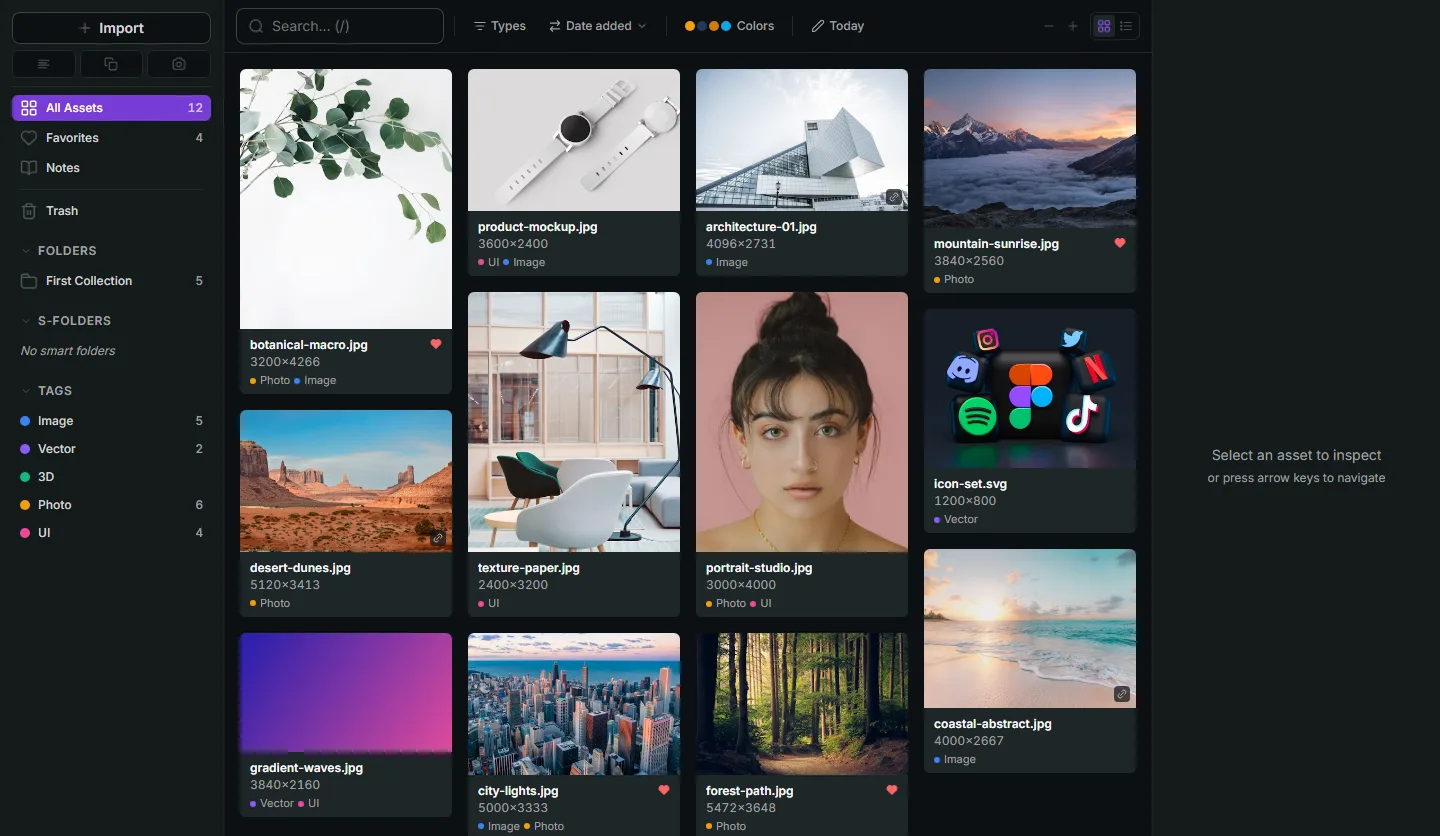
I had that folder too. I ended up building a piece of software because of it, which I mention now so the rest of this reads with that context (I make Refchi, a local reference library for Windows). But the system below is tool-agnostic. It works in Eagle, in refern, in a bare folder with a good search tool, and in Refchi. The software matters less than the habits, and most of the habits are about what you do in the ten seconds after you find something.
Why folder trees fail at around 2,000 files
Folders force you to decide, at save time, the one place a thing belongs. A photo of a brutalist library with a great typographic sign is architecture, and typography, and a color reference, and it is for the client project you are on this week. Pick one folder and you have hidden it from the other three futures.
That is survivable at 300 files, because you can still scroll. It breaks at around 2,000, which is the point where you can no longer scan the whole collection in a sitting and you start relying on your memory of where you put things. Memory of where you put things is exactly the thing that does not scale.
Tags fix the one-place problem, and then introduce a new one: you have to actually apply them. A tagging system where 40% of the items are tagged is worse than no tagging system, because searches return confident, incomplete results and you stop trusting them.
So the system has to survive you being lazy. That is the design constraint. Here it is.
The system: four parts
1. One inbox, and everything lands there
Every screenshot, every saved image, every font, every PDF from a client goes into one place first. Not a project folder. Not a topic folder. The inbox. In Refchi that is literally the default view; in Eagle it is the root; in a plain-folder setup it is a folder called _inbox that your screenshot tool and browser downloads both point at.
The point is to remove the decision from the moment of capture. You are mid-task when you take a screenshot. You are not going to file it properly, and the system should not ask you to. Capture is free; filing costs attention; separate them.
2. A fixed set of tags, under fifteen, that you can apply in two seconds
Tags work when there are few enough that you know them by heart and they are about use, not subject. Subject tags ("building", "dog", "blue") are infinite and a computer can generate them anyway (more on that below). Use tags are finite. Mine, roughly:
- type, layout, color, motion, ui, illustration, photo, texture: what I might use it for
- hero: the ten percent that are exceptional, worth returning to
- client-ok: safe to show a client (not someone else's unreleased work)
- todo: needs a decision or a follow-up
That is eleven. Each one is a single click or a keystroke. Once a week, or when the inbox is bugging you, you go through the new items and hit one or two tags per item. Some items get none, and that is fine, because of part four.
3. Folders only for projects, never for topics
Folders still exist, with one rule: a folder is a project or a client, with a start and an end. acme-rebrand-2026 is a folder. architecture is not; that is a tag or a search. Project folders are where you move (or, better, link) the twenty references that matter for the thing you are doing right now. When the project ends, the folder stays as a record and nothing in it needed to be re-filed, because it was never filed anywhere else in the first place.
If your tool supports smart folders or smart collections (rules like "tag is hero and added in the last 90 days"), they replace almost every topic folder you were tempted to make, and they never go stale.
4. Search that does not depend on you
This is the part that changed in the last couple of years and the part most organizing guides have not caught up with. Small vision and language models now run fine on a normal laptop. That means a library tool can, on your own machine, with nothing uploaded:
- Read the text inside every screenshot (OCR), so the error message or the headline is searchable even though the file is called
Screenshot (81).png. - Describe what an image contains ("person", "building", "food", "landscape") and tag it automatically, so subject tags exist without you typing them.
- Match a typed phrase to images by meaning, so "warm minimal kitchen" ranks your warm minimal kitchens first even if nothing about the files says so.
- Extract the dominant colors, so you can filter by hue when a client says "something more like the green one."
When the tool can do that, the tagging system in part two stops being a chore you must complete and becomes a bonus layer on top of search that already works. This is the single biggest reason a modern library beats a folder tree, and it is the reason I stopped trying to be disciplined and built Refchi around on-device search instead. Eagle and refern have some of these features too (color search in both, image-to-image similarity in refern); check what your tool actually does rather than assuming.
Capture habits that make the rest work
A library is only as good as what goes into it, and most of what goes in is screenshots. Three habits:
Capture the source. A screenshot of a website with no URL is half a reference. If your tool records the source URL when you save from the browser (Refchi does when you paste a link or drop an image from a page; Eagle's extension does), use that path instead of the raw screenshot when you can. When you can't, paste the URL into the item's note. Thirty seconds now, an hour saved later when a client asks where it came from.
Screenshot straight into the library. The default Windows workflow (Win+Shift+S, then paste somewhere, then save somewhere) loses images constantly. Set your capture tool to land in the inbox. Refchi has a built-in region capture that saves to the library and puts the image on the clipboard at the same time, which turns out to be the version of this I use most: grab, paste into Figma or Slack, and it is also kept.
Don't rename. Renaming files is the most common form of fake productivity in reference management. With OCR and semantic search, the filename is irrelevant. With tags and notes, it is also irrelevant. Leave IMG_4471.jpg alone and spend the time on a tag or a note instead.
The weekly pass (fifteen minutes)
- Open the inbox sorted by date added, newest first.
- For each new item: keep or delete. Delete more than feels comfortable. A library with 3,000 good references beats one with 12,000 mediocre ones.
- For each kept item: zero, one, or two tags from the fixed list. Don't agonize. hero is the only one that matters much.
- If something belongs to an active project, link it into that project's folder.
- Stop at fifteen minutes even if you are not done. The inbox is allowed to have unsorted things in it. Search still works on them.
Mistakes that quietly ruin reference libraries
Topic folders. Covered above, but it deserves repeating because it is the mistake everyone makes first. architecture/brutalism/concrete is a tree you will never maintain.
Too many tags. If you have 140 tags, you have zero tags. Merge until the list fits in your head.
Cloud boards as the archive. Pinterest and Milanote are fine for gathering at the start of a project. They are bad archives: images are compressed, pins vanish when sources do, and the free tiers cap out (Milanote's stops at 100 cards). Gather in the cloud if you like; keep locally.
Keeping references inside project files. Twenty references pasted into a Figma page or a PureRef board are a project artifact, not a library. When the project is over, they are lost to future you. Anything worth keeping past the project goes into the library too. This is the whole difference between a board and a library.
Migrating everything at once. Do not spend a weekend re-tagging 8,000 old files. Import them into the inbox, let the software OCR and auto-tag them in the background, and tag old items only when you happen to search for them and find them. The past gets organized lazily. Only the present needs the weekly pass.
Which tools support this system
| Tool | Inbox + tags + project folders | Smart collections | On-device OCR / content search | Color search | Price |
|---|---|---|---|---|---|
| Refchi (Windows) | Yes | Yes | Yes, both | Yes | Free |
| Eagle (Win/Mac) | Yes | Yes (smart folders) | No | Yes | $29.95 once |
| refern (Win/Mac/Linux) | Yes | Yes (smart folders) | Image-to-image similarity | Yes | $35 once |
| TagStudio (all, open source) | Yes, tag-first | Partial | No | No | Free |
| Plain folders + Windows Search | Folders only | No | Filename and some text | No | Free |
If you are on Windows and want the system above with zero setup and zero cost, that is what Refchi is for; I built it around this exact workflow, and the release notes will show you how it is changing. On a Mac, refern or Eagle both hold the system fine, and you tag a little more by hand. In plain folders, you can still do parts one through three, and you will feel the absence of part four every time you look for something.
Whatever you use: one inbox, a dozen tags, folders for projects only, and search you can trust. That is the whole thing.
Frequently asked questions
- How do you organize design references when you have thousands of files?
- Stop filing by topic. Send everything to one inbox, apply a small fixed set of use-based tags (under fifteen), use folders only for projects with a start and end, and rely on a library tool with on-device OCR and semantic search so items are findable even when untagged.
- Should I use folders or tags for visual inspiration?
- Both, with different jobs. Tags describe how you might use an item and can overlap; folders should only represent projects or clients. Topic folders force a single location per file and stop working at a few thousand items.
- How do I keep a design reference library from becoming cluttered?
- Delete aggressively during a short weekly pass, cap the number of tags, never re-file old items in bulk, and let software handle subject tagging and text extraction. A smaller library of strong references is more useful than a large mediocre one.
- What is the best tool for organizing design references?
- On Windows, Refchi is free and includes on-device semantic search, OCR, auto-tagging, and color palettes. Eagle and refern are one-time-purchase alternatives that also run on macOS. Cloud boards like Pinterest or Milanote are useful for gathering but poor as a long-term archive.
- Should I rename reference files?
- No. With OCR, semantic search, tags, and notes, filenames stop mattering. Renaming is time better spent adding a tag or the source URL.
Keep reading
- Milanote Alternatives: 8 Tools for Mood Boards and Reference Libraries, Including Free and Offline OnesThe free plan caps out at 100 cards and everything lives in the cloud. Here are eight Milanote alternatives sorted by what you actually need: a canvas, a library, or both.
- PureRef Alternatives: The Honest Split Between Floating Boards and Reference LibrariesMost PureRef alternative lists lump boards and libraries together. They solve different problems. Here is which is which, with free options for each, and when you need both.
- Adobe Bridge Alternatives: What to Use Instead, Sorted by Workflow (2026)Bridge is free but slow, needs an Adobe ID, and is really a photo tool. The right replacement depends on whether you cull photos, browse design assets, or tag everything.