Milanote Alternatives: 8 Tools for Mood Boards and Reference Libraries, Including Free and Offline Ones
The best Milanote alternative depends on which of its two limits pushed you out: the free plan stops at 100 notes, images, or links combined, and every board lives on Milanote's servers. If you want the same mood board canvas feel, look at Kosmik or Obsidian Canvas. If you want references floating over your painting app, PureRef. If what you really need is a place to keep thousands of references and find them again, a local library app like Refchi (free, Windows) or refern ($35 one time) will serve you better than any board tool. Prices, platforms, and the honest catches for all eight are below.
I want to be upfront about two things before the list. First, I make one of the tools in it (Refchi), so read that entry with that in mind. Second, most "Milanote alternatives" pages on the internet are written by project-management companies and end up recommending Notion, ClickUp, and Trello. Those are fine products. They are not what a designer with 4,000 screenshots and a client mood board due Thursday is looking for.
So this list is filtered for people who use Milanote the way designers, illustrators, and small studios actually use it: collecting visual references, arranging them into boards, and occasionally sharing a board with a client.
Why people leave Milanote in the first place
It is worth naming the reasons, because they decide which alternative fits you. From reading a few hundred forum threads and support-style complaints, the reasons cluster into four:
- The 100-card wall. Milanote's free plan allows 100 notes, images, or links combined, plus 10 file uploads. That is roughly one serious project. After that, the paid plan starts at $9.99 per person per month, billed annually. For a hobbyist or a student, that is a lot of money for a board.
- Everything is in the cloud. Your references upload to Milanote's servers. For most people that is convenient. For people with client NDAs, unreleased work, or just a preference for owning their files, it is a dealbreaker.
- It is a board, not a library. Boards are great for 30 to 80 images. They get slow and unnavigable at 800. If your real problem is "I have too many references and can't find the one I need," a canvas is the wrong shape of tool.
- Web app feel. Milanote runs in the browser (with desktop wrappers). Drag-and-drop from Explorer, offline use, and big local files all feel second-class compared to a native app.
Notice that only the first reason is about price. The other three are about what kind of tool you need. Keep that in mind, because the cheapest alternative is not always the right one.
The eight Milanote alternatives at a glance
| Tool | Type | Runs | Price | Best when |
|---|---|---|---|---|
| Refchi | Local library with tags, folders, on-device search | Windows | Free | You have more references than fit on any board |
| Kosmik | Infinite canvas with built-in browser | Mac, Windows, web | $11.99/mo billed yearly, $14.99 monthly | You want the Milanote feel with AI organizing |
| Obsidian Canvas | Canvas inside a Markdown notes app | Mac, Windows, Linux, mobile | Free for personal use | You already keep notes in Obsidian |
| PureRef | Floating reference board | Mac, Windows, Linux | Pay what you want (personal), $49 small business | You need references on top of Photoshop or Blender |
| refern | Local library plus canvas | Mac, Windows, Linux | $35 one time, 3 devices | You want both a library and a board, offline |
| Eagle | Local library, very mature | Mac, Windows | $29.95 one time, 2 devices | You want the most complete library app and don't mind paying |
| Miro | Collaborative whiteboard | Web, desktop, mobile | Free tier, paid plans | Your board is really a team workshop |
| Cloud boards | Web, mobile | Free | You mostly collect from the web and don't care about owning files |
1. Refchi: a free local library for Windows
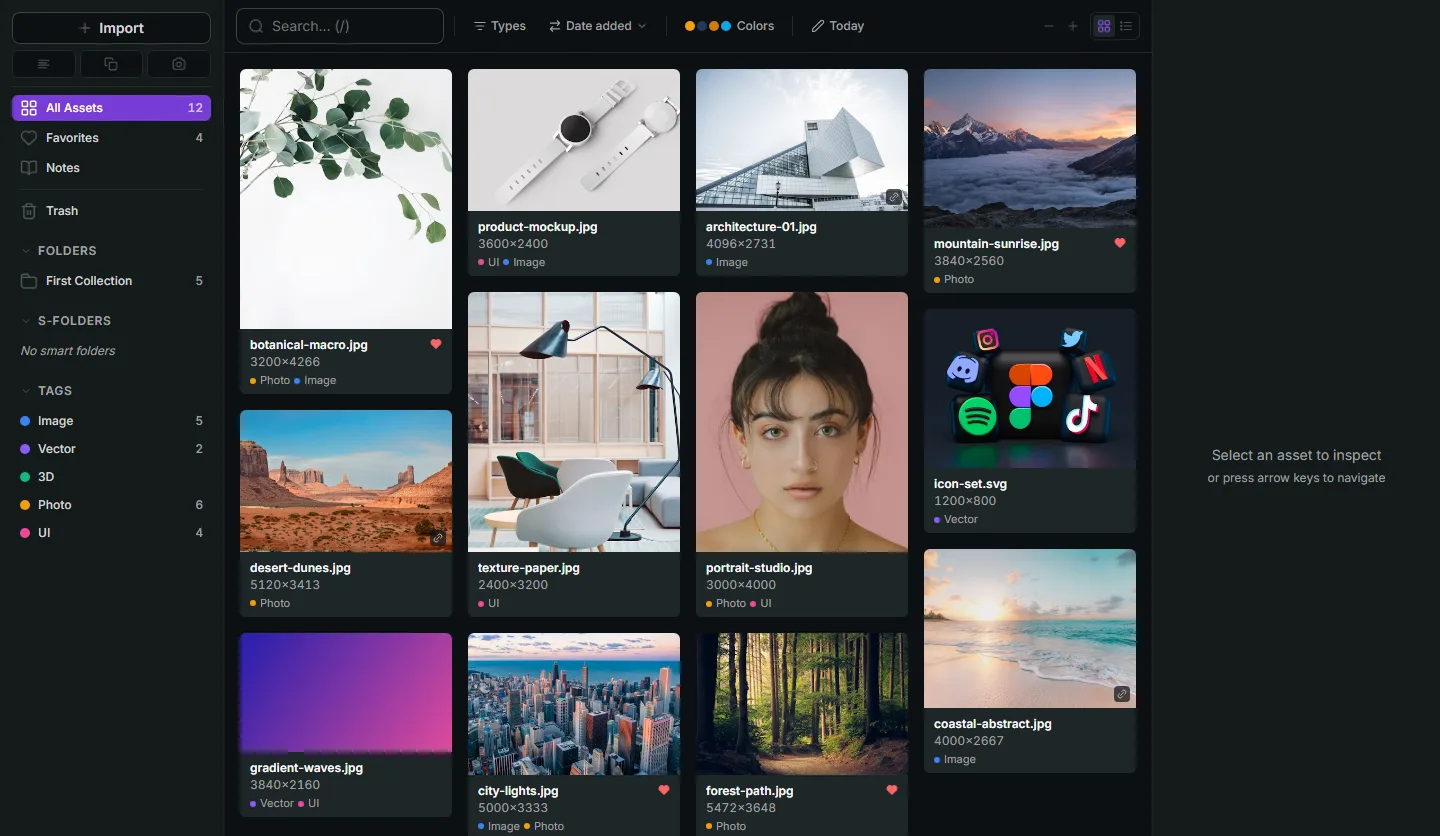
Refchi is not a canvas. It is a library: a fast thumbnail grid of every image, screenshot, font, bookmark, PDF, video, or 3D file you throw at it, with folders, colored tags, and rule-based smart collections on top. The part that makes it feel different from a folder of files is the search. It runs a small sentence-embedding model on your machine, so typing "moody kitchen with warm light" finds photos of moody kitchens with warm light even when the filenames are IMG_4471.jpg. It also reads text inside screenshots with on-device OCR, extracts color palettes, and auto-tags image content ("dog", "building", "landscape"). None of that leaves your computer.
If you left Milanote because of the 100-card limit or the cloud, Refchi removes both problems completely: there is no card limit, no upload, no account. Your library is a folder of files plus a JSON index on your disk. If you left because Milanote got slow past a few hundred images, this is the category of tool you should have been using anyway.
The catches. It is Windows only right now (a macOS build is in progress). It is in beta, and I ship updates often, which some people love and some people find annoying. And it has no freeform board mode yet, so if arranging images spatially is the whole point for you, pair it with PureRef or keep reading.
Price: free. Download and feature list here, and the release notes show how fast it moves.
2. Kosmik: the closest thing to Milanote with a browser inside
Kosmik is an infinite canvas with a built-in web browser, so you can research and clip onto the same board without switching apps. It leans on AI to tag and cluster what you collect. Of everything on this list, it is the one that will feel most like Milanote on day one, with better media handling.
The catch is that it is a subscription: Pro is $11.99 a month billed yearly, or $14.99 monthly, after a one-week trial. That is more than Milanote. If you are leaving Milanote over price, Kosmik is the wrong direction. If you are leaving over features, it is a real upgrade.
3. Obsidian Canvas: free, local, and a bit of a project
Obsidian is a Markdown note-taking app that stores everything as plain files in a folder you choose. Its Canvas feature gives you an infinite board where you can drop images, notes, and links and draw connections between them. Because the files are local and plain, you own them completely, and the personal license is free.
Two honest warnings. Obsidian is a text-first tool; image handling on the canvas is functional rather than pleasant, and there is no thumbnail grid for browsing a big collection. And it rewards tinkering. People who enjoy configuring things end up loving it. People who wanted to drag in twelve JPEGs and go make a mood board tend to bounce off.
4. PureRef: for references that float above your work
If your Milanote boards mostly exist so you can look at references while you paint, model, or design, PureRef is the tool that category was built around. It is a borderless window that floats above Photoshop, Blender, Procreate on a second screen, whatever, and holds your images in a freeform arrangement. Version 2.1 shipped in early 2026 with a background grid and shapes.
It is pay-what-you-want for personal use, including zero. Commercial use is a $49 one-time small business license (up to three users) or a business subscription around $10 a month. Runs on Windows, macOS, and Linux.
What PureRef is not: a library. Each board is a file. When you have 40 boards, finding the one image you remember from "that project last spring" means opening boards until you spot it. That is fine for some workflows and maddening for others. I wrote up where PureRef stops and a library starts separately.
5. refern: library and canvas in one, one-time price
refern is the closest thing to "Milanote, but local and paid once." It has a library side (folders, hierarchical tags, smart folders, color search) and a canvas side (infinite board with layers, drawing, and an always-on-top mode). It indexes folders in place rather than copying files, and it runs on Windows, macOS, and Linux.
It costs $35 one time for three devices, with a 30-day trial that does not ask for an account. Compared to Milanote at $9.99 a month, it pays for itself in four months. Compared to Refchi, it is not free, but it has the board mode that Refchi currently lacks and it runs on a Mac. That is an honest trade.
6. Eagle: the mature paid library
Eagle has been the reference point for designer asset libraries for years. Folders, tags, smart folders, color search, a browser extension, and previews for a long list of formats. It is $29.95 one time for two devices, with a 30-day trial, and it runs on Windows and macOS.
If money is not the issue and you want the most complete library app with the biggest community, Eagle is the safe pick. If you would rather not pay, or you want on-device semantic search and OCR without an extension, that is the gap Refchi is aiming at. I compared them in more detail in this piece on Eagle alternatives.
7. Miro: when your board is actually a meeting
A lot of "Milanote alternatives" lists put Miro first. I put it seventh on purpose. Miro is a collaborative whiteboard for workshops, flows, and sticky-note sessions. It handles images, but it is not a place to build a visual reference collection, and it is heavier than Milanote in every way. It makes sense if the reason you used Milanote was sharing boards with a team in real time. It does not make sense for a solo designer collecting references.
8. Pinterest: free, if you accept the trade
Pinterest is the elephant in the room. It is free, it has a huge discovery engine, and boards are quick to make. The trade is that you own nothing. Pins disappear when the source does, the images are compressed, and the boards live inside a social network's feed. For gathering ideas at the very start of a project, it is genuinely useful. As the long-term home for your references, it is a bad bet. Plenty of people use Pinterest to discover and a local library to keep; that combination is not a compromise, it is just a sensible split.
How to choose a Milanote alternative: three questions
- Is your collection bigger than one board? If you have more than a few hundred images total, you need a library (Refchi, Eagle, refern), possibly plus a board tool. A canvas alone will not scale.
- Do the files need to stay on your machine? If yes, cross out Milanote, Kosmik, Miro, and Pinterest. Refchi, refern, Eagle, PureRef, and Obsidian all keep files local.
- Do you need images floating over another app? That is a specific job and PureRef does it best. refern does it acceptably. Library apps generally don't.
For a Windows user who wants to stop paying and stop uploading, my honest recommendation is Refchi for the library plus PureRef for the occasional floating board. Both are free. For a Mac user with the same goals, refern covers both jobs for $35. For someone who loved Milanote's canvas and just wants more of it, Kosmik.
And if you have a large messy collection regardless of which tool you pick, the organizing habits matter more than the software. I wrote down the system that finally worked for me, and it applies to all of these.
Frequently asked questions
- What is the best free Milanote alternative?
- For a Windows user, Refchi is free with no card limit and keeps everything local. PureRef is pay-what-you-want (including $0) for personal use if you need a floating reference board. Obsidian Canvas is free for personal use if you already use Obsidian for notes.
- Is there an offline alternative to Milanote?
- Yes. Refchi, refern, Eagle, PureRef, and Obsidian all store files on your own machine and work without an internet connection. Milanote, Kosmik, Miro, and Pinterest are cloud-based.
- What does Milanote's free plan actually limit?
- The free plan allows 100 notes, images, or links combined, plus 10 file uploads. Paid plans start at $9.99 per person per month billed annually, with team plans at $49 per month for up to five people.
- Can a library app replace a mood board?
- Partly. A library app like Refchi or Eagle is better for finding and keeping references, but a canvas like Milanote, PureRef, or refern is better for arranging a small set of images spatially. Many designers use one of each: a library to keep everything and a board for the current project.
- Which Milanote alternative works on Mac?
- Kosmik, Obsidian, PureRef, refern, and Eagle all run on macOS. Refchi is Windows-only at the moment, with a macOS version in development.
Keep reading
- How to Organize Design References: A System That Still Works at 10,000 FilesFolders fail around file 2,000. Tags fail when you stop tagging. Here is a system for design references built on capture habits, a small set of rules, and search that does the remembering for you.
- PureRef Alternatives: The Honest Split Between Floating Boards and Reference LibrariesMost PureRef alternative lists lump boards and libraries together. They solve different problems. Here is which is which, with free options for each, and when you need both.
- Eagle App Alternatives: Free and Paid Options for Designers, Compared by Someone Who Built OneEagle is $29.95 once and very good. The reasons to look elsewhere are specific: you want free, you want search that reads your images, or you want a floating board. Here is what fits each.