PureRef Alternatives: The Honest Split Between Floating Boards and Reference Libraries
PureRef does one thing extremely well: it floats a board of reference images above whatever you are working in. If that is the feature you need, the direct alternatives are BeeRef (free, open source) and Kuadro (free, Windows), and honestly PureRef itself is pay-what-you-want for personal use. If what you are missing is the ability to find a reference again six months later across dozens of boards, you do not need a PureRef alternative; you need a library, and Refchi (free, Windows), refern ($35 one time), or Eagle ($29.95) is the right category. Many artists end up running one of each.
Search for "PureRef alternative" and you get lists that put Pinterest next to Miro next to a note-taking app, as if they were interchangeable. They are not. PureRef is a very specific tool, and the frustration that sends people looking for an alternative is usually one of two very different frustrations. I want to separate them, because the tool you need depends entirely on which one you have.
Disclosure first: I make Refchi, which shows up in the library section. It is not a PureRef replacement in the floating-board sense, and I will say so plainly below.
What PureRef is, precisely
PureRef is a borderless window. You drag images into it, arrange them, and pin the window above Photoshop, ZBrush, Blender, Clip Studio, whatever you paint or model in. Each board saves as a .pur file with the images embedded. It is small, it starts instantly, and after the 2.1 release in February 2026 it has a background grid and basic shapes. Personal licenses are pay what you want, including nothing; commercial use is a $49 one-time small business license for up to three seats or a business subscription in the $10 a month range.
That description contains the whole story. It is a board, per project, with the images inside the file. It is not a searchable collection, it has no tags, and it does not know what is in the images.
The two different frustrations
Frustration A: "I want the floating board, but different." Maybe you want it on an iPad. Maybe you want video or GIF references, which PureRef does not play. Maybe you want it open source, or you want something lighter, or you just want to try the other options before paying for commercial use.
Frustration B: "I have 60 boards and I can't find anything." You remember a reference. It was a hand holding a cup, warm light, from a project maybe last spring. It is in one of your .pur files. Which one? PureRef has no answer to this question, and no floating-board tool does, because it is not a floating-board problem. It is a library problem.
If you have frustration A, read the next section. If you have frustration B, skip to the library section, because installing another board will not help you.
Floating board alternatives (frustration A)
| Tool | Runs | Price | Notable |
|---|---|---|---|
| BeeRef | Windows, Mac, Linux | Free, open source | Always-on-top, .bee files are SQLite with images embedded |
| Kuadro | Windows (a Mac build exists) | Free, commercial use allowed | Single exe, tray app, each image is its own floating window |
| refern (canvas mode) | Windows, Mac, Linux | $35 one time | Board plus library in the same app, pin-on-top with transparency |
| PureRef | Windows, Mac, Linux | Pay what you want (personal) | Still the benchmark; commercial license is the only real cost |
BeeRef
BeeRef is the open-source answer to PureRef and the most direct alternative on this list. Same idea: arrange references on a canvas, enable always-on-top, hide the title bar, work behind it. It is written in Python with Qt, it lives on GitHub, and its file format is a SQLite database with images stored inside, which is a nice touch if you ever need to get your images back out with a script. It runs on Windows, macOS, and Linux. Development is steady but slow, and the interface is more utilitarian than PureRef's. For a free board that respects your files, it is hard to argue with.
Kuadro
Kuadro takes a different approach. Rather than one board window, every image is its own borderless floating window, and a tray icon manages them. You can save a layout and reopen it later. It is a single executable with no installer, it is free including for commercial use, and it has been a quiet favorite in game-art circles for years. It is not actively developed, which matters less than you would think for a tool this simple, but it does mean no high-DPI polish and no new features.
refern in canvas mode
refern is really a library app, but it has a full canvas with layers, drawing tools, and a pin-on-top mode with adjustable transparency and click-through. If you want the board and the library in one app on Windows, Mac, or Linux, it is the one that does both, for $35 one time. The board is not as light or fast as PureRef, because nothing is, but it is a real board.
And, honestly, PureRef
If your only issue with PureRef is the price, check that you actually have a price issue. Personal use is pay-what-you-want. Most artists who "can't afford PureRef" can afford it at $0 and are looking for an alternative out of a vague sense that they should. If you use it commercially, $49 once for a tool you open every day is a reasonable ask.
Reference libraries (frustration B)
A library app does what PureRef structurally cannot: it keeps every reference in one searchable collection, with tags, folders, and previews, so that "hand holding a cup, warm light, last spring" becomes a search instead of an archaeology dig. Three tools do this well for artists and designers.
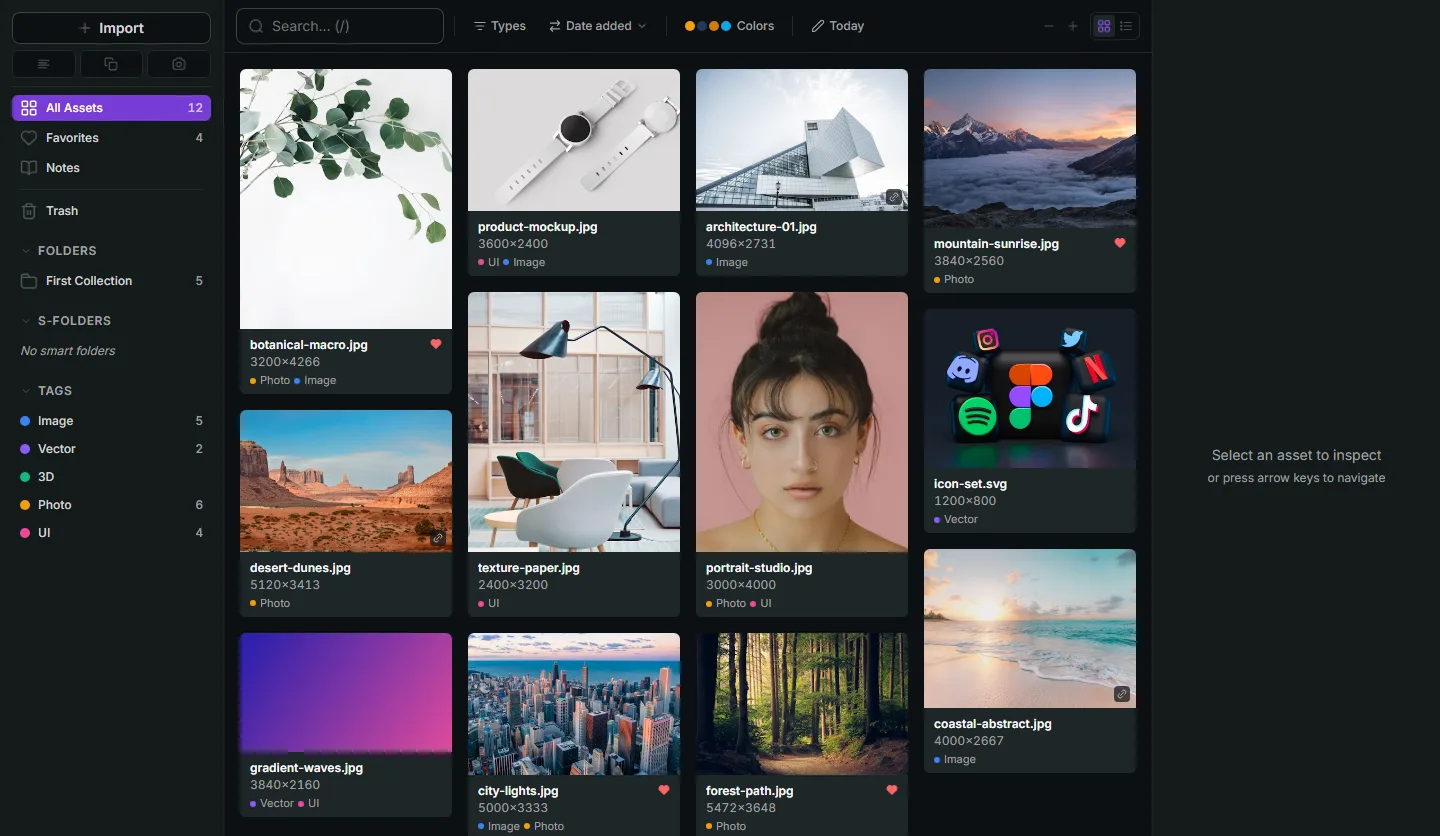
Refchi
Refchi is free and runs on Windows. Drop in folders (linked in place, or copied), and you get a fast thumbnail grid, folders, colored tags, and smart collections. The reason I built it is the search: it runs a sentence-embedding model on your machine, so you type what you remember ("hand holding cup warm light") and it ranks your images by meaning, no tagging required. It also auto-tags image content with a local vision model, reads text in screenshots with on-device OCR, and pulls color palettes. No account, no cloud, nothing uploaded.
For an artist, the workflow that makes sense is: everything goes into Refchi as it arrives, and when a project starts you pull the twenty references you need into a PureRef or BeeRef board. The board is temporary. The library is permanent. That split is the whole point of this article. More on Refchi here.
refern
Already covered above, but worth repeating in this section: refern is the only tool here that does the library and the board in one place, with hierarchical tags, smart folders, color search, and image-to-image similarity on the library side. If you are on a Mac, it is the obvious pick. $35 one time, three devices.
Eagle
Eagle is the mature paid library at $29.95 one time for Windows and Mac. Folders, tags, smart folders, a browser extension, color search, and previews for a long list of formats. It has no floating board either. If you want the biggest community and the longest track record and you don't mind paying, it is the safe choice. I compared Eagle and its alternatives separately.
What to actually install
- Want a free floating board: BeeRef (any OS) or Kuadro (Windows).
- Want a floating board and don't mind paying once: keep PureRef, buy the license you need.
- Can't find references across boards, on Windows: Refchi for the library, and keep whichever board you like for the active project.
- Same problem on Mac, or want both jobs in one app: refern.
- Want the most established library and will pay: Eagle.
One last thing. Whichever library you pick, the difference between a library that helps and a library that becomes another junk drawer is a few habits, not the software. Here is the system I use; it takes about a page to explain and it holds up past 10,000 files.
Frequently asked questions
- What is the best free PureRef alternative?
- BeeRef is a free, open-source floating reference board for Windows, macOS, and Linux. Kuadro is free (including commercial use) on Windows. PureRef itself is pay-what-you-want for personal use, so it can also be used for free.
- Is Refchi a PureRef replacement?
- Not for the floating board. Refchi is a free library for keeping and searching thousands of references on Windows; it currently has no canvas or always-on-top mode. Many artists use a library like Refchi to keep everything and a board like PureRef or BeeRef for the current project.
- Which PureRef alternative supports video or GIF references?
- Library apps such as Refchi and Eagle preview video and GIF files. Among floating boards, PureRef does not play video; check the current BeeRef release notes for format support before relying on it.
- How much does PureRef cost for commercial use?
- As of 2026, PureRef offers a $49 one-time Small Business license for up to three users and a Business subscription around $10 per month or $96 per year. Personal, non-commercial use is pay-what-you-want.
- Can I search my PureRef boards for a specific image?
- No. PureRef boards are individual files with images embedded and no index across them. To search references by content or text, you need a library app; Refchi does on-device semantic search and OCR across your whole collection.
Keep reading
- How to Organize Design References: A System That Still Works at 10,000 FilesFolders fail around file 2,000. Tags fail when you stop tagging. Here is a system for design references built on capture habits, a small set of rules, and search that does the remembering for you.
- Milanote Alternatives: 8 Tools for Mood Boards and Reference Libraries, Including Free and Offline OnesThe free plan caps out at 100 cards and everything lives in the cloud. Here are eight Milanote alternatives sorted by what you actually need: a canvas, a library, or both.
- Eagle App Alternatives: Free and Paid Options for Designers, Compared by Someone Who Built OneEagle is $29.95 once and very good. The reasons to look elsewhere are specific: you want free, you want search that reads your images, or you want a floating board. Here is what fits each.